
Overview
A product configurator that became a connected operational commerce system.
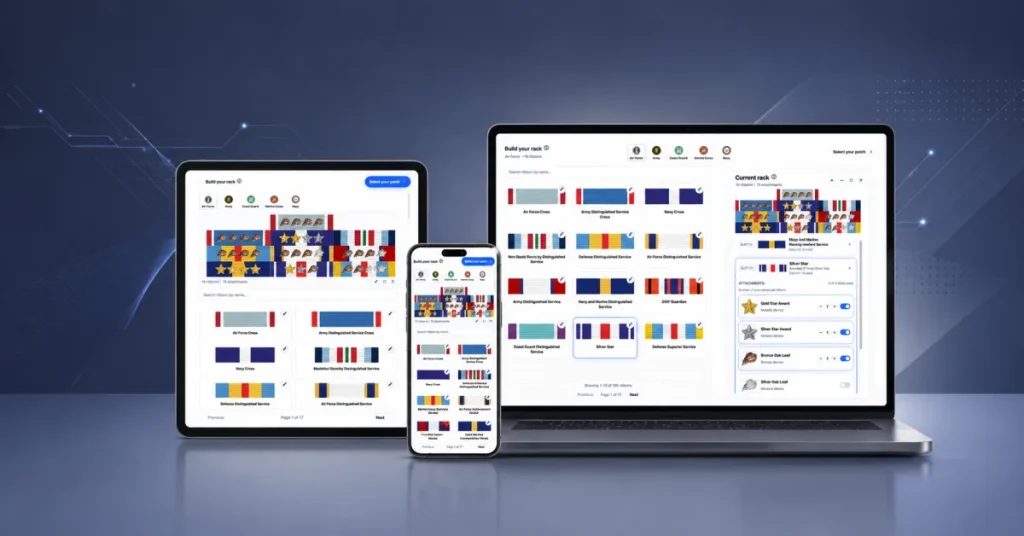
Show Your Stripes needed a flexible WooCommerce system where customers could visually build military ribbon racks, configure ribbon-specific attachments, select patches independently, and carry every selection through ordering, production, and fulfillment.
This was not a traditional WooCommerce customization. The platform had to make a complex military catalogue intuitive for customers while preserving structured operational logic behind the scenes.
Customer configuration
- Visual ribbon-rack construction
- Branch-aware ordering
- Ribbon-specific attachments
- Independent patch selection
Order continuity
- Structured configuration persistence
- Cart and checkout visibility
- Account, email, and admin context
- Operational validation
Production operations
- Production-ready SVG assets
- Backend catalogue tooling
- Import and export workflows
- Long-term catalogue scalability
Challenge & role
Standard product variations could not represent the real workflow.
Traditional WooCommerce products are designed around variations, dropdowns, and simple option selection. Military ribbon systems introduce branch-specific relationships, precedence rules, visual composition, attachment logic, independent patch workflows, dynamic configuration structures, production-sensitive layouts, and operational continuity after checkout.
The challenge was not simply to let customers choose options. It was to connect customization, validation, order persistence, fulfillment preparation, and production inside one scalable system.
I took the client’s concept through product thinking, design, and development.
I worked directly with the client to turn the initial concept into a usable product and scalable technical system. I owned the experience design, workflow architecture, WooCommerce engineering, backend management tools, configuration persistence, and production-facing SVG pipeline.
Guided experience
Complexity is introduced only when the customer needs it.
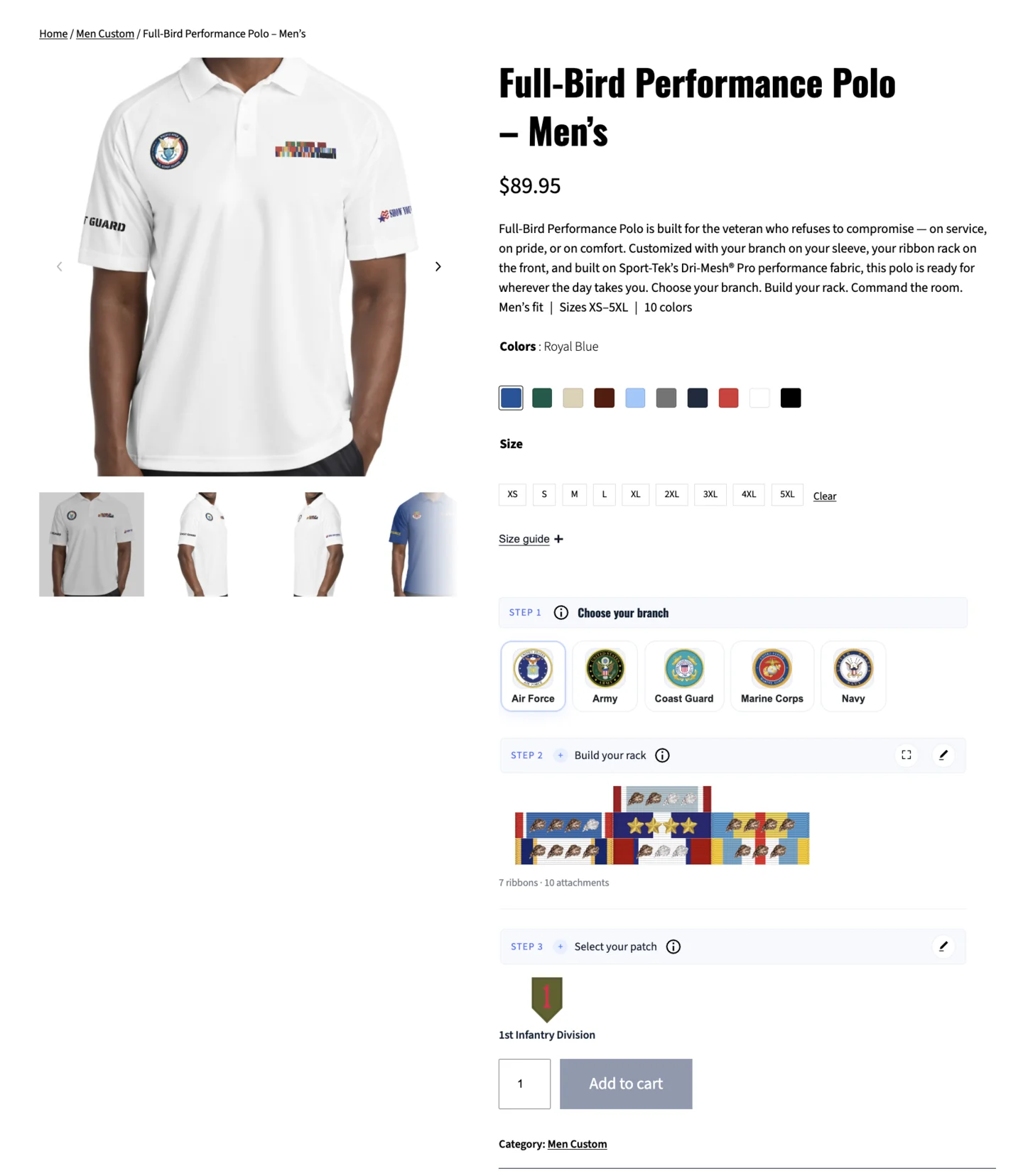
Large ribbon catalogues, branch-specific rules, visual hierarchy, attachment relationships, and multiple workflow layers could easily overwhelm customers. The experience therefore uses progressive disclosure: familiar apparel options appear first, followed by a guided builder that introduces the specialized workflow step by step.
- Choose standard optionsCustomers begin with familiar apparel choices such as colour, size, and quantity.
- Select a branchThe branch establishes ribbon availability, precedence, relationships, attachment behaviour, patch visibility, filtering, and operational rules.
- Build the ribbon rackCustomers search the catalogue, add ribbons, edit the composition, configure attachments, and maintain a persistent visual preview.
- Select patchesPatch choice remains a separate workflow so unrelated configuration concepts stay clear and flexible.
- Review and orderStructured selections remain visible through cart, checkout, accounts, emails, admin, production preparation, and fulfillment.
The customer sees an approachable sequence rather than the entire technical model at once. Underneath that interface, the platform continuously manages branch rules, catalogue relationships, validation, persistence, and the production meaning of every selection. This preserves operational structure without making the customer learn the internal system.
Builder architecture
The visual builder and the operational data model were designed together.
Branch-aware foundation
Branch selection dynamically controls relevant ribbons, precedence order, product relationships, attachments, patches, builder filtering, and operational rules. Irrelevant or conflicting choices are removed before they create customer confusion or fulfillment ambiguity.
- Cleaner ordering flows
- Better operational consistency
- Reduced customer confusion
- Improved fulfillment accuracy
Ribbon catalogue and rack composition
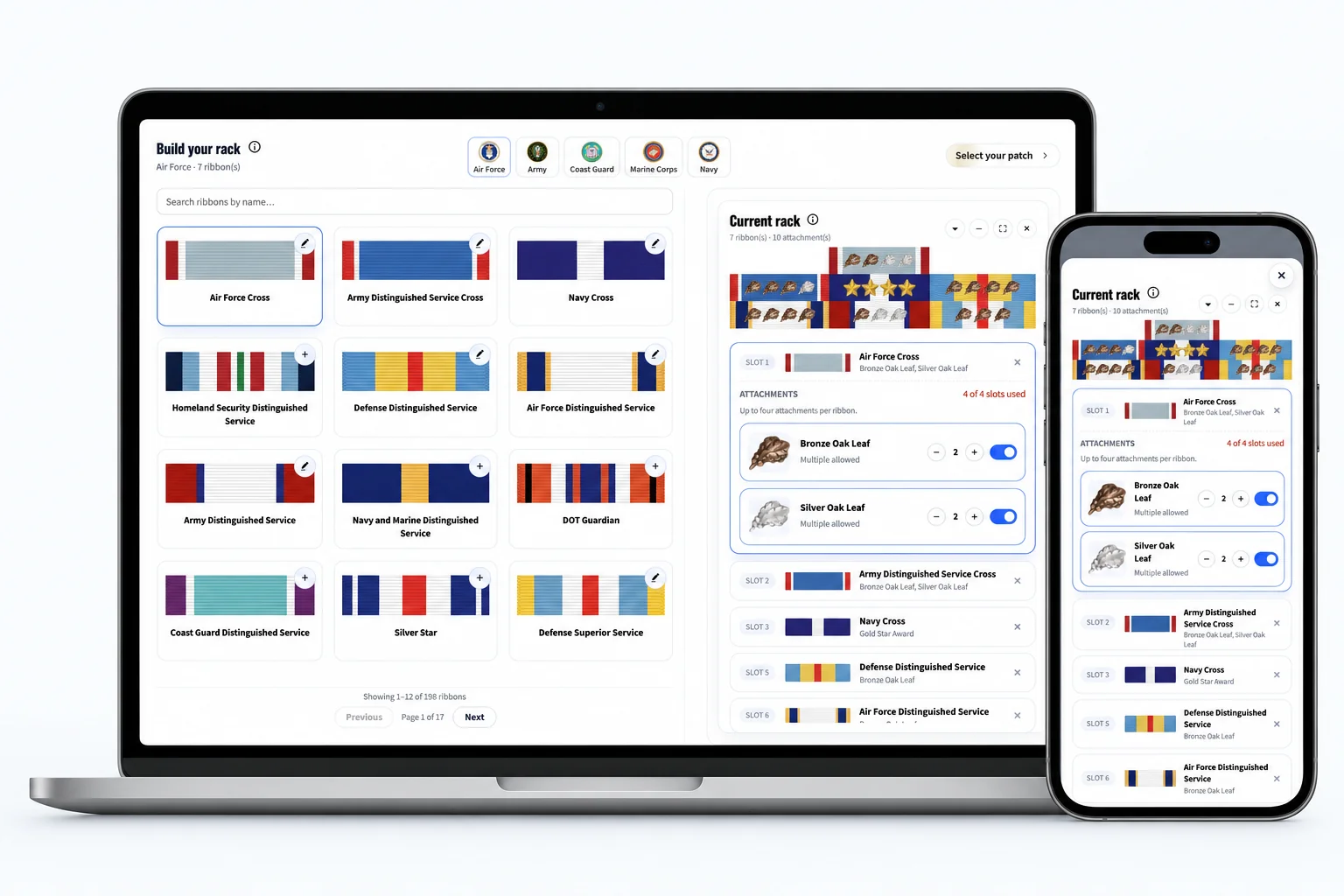
The builder supports searchable, paginated ribbon libraries, dynamic rack editing, persistent previews, and structured rack persistence. Large catalogues remain browsable while customers continuously see their current configuration. The platform applies branch-aware precedence, validates relationships, and keeps the rack editable throughout the guided flow.
- Visual ribbon search
- Step-by-step rack building
- Dynamic layout editing
- Branch-aware precedence
- Operational validation
Real-time visual continuity
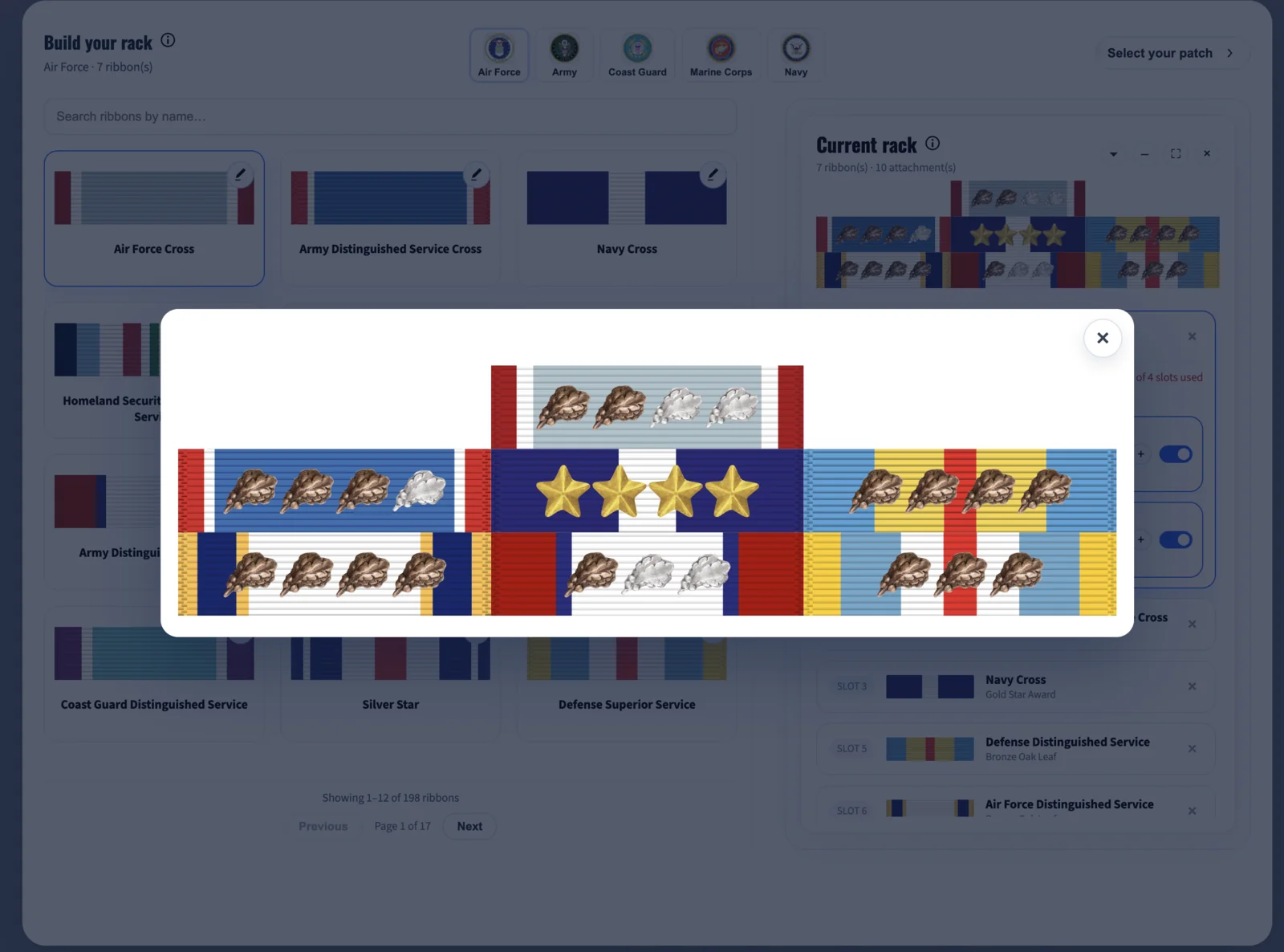
A persistent preview shows the current rack, ribbon order, attachment placement, and every configuration change in real time. Customers do not have to remember earlier choices or imagine the final composition. This translates a technical process into a visual workflow they can understand and trust.
- Higher configuration confidence
- Clearer visual understanding
- Better operational clarity
- Fewer fulfillment errors
Attachments as structural components
Attachments affect spacing, physical composition, production preparation, and fulfillment accuracy, so they are configured inside the rack rather than treated as generic add-ons. Ribbon-level relationships, slot rules, sizing behaviour, and multiple attachment paths remain attached to the correct structural context.
- Ribbon-level relationships
- Attachment slot logic
- Sizing behaviour
- Multiple attachment workflows
- Structured persistence
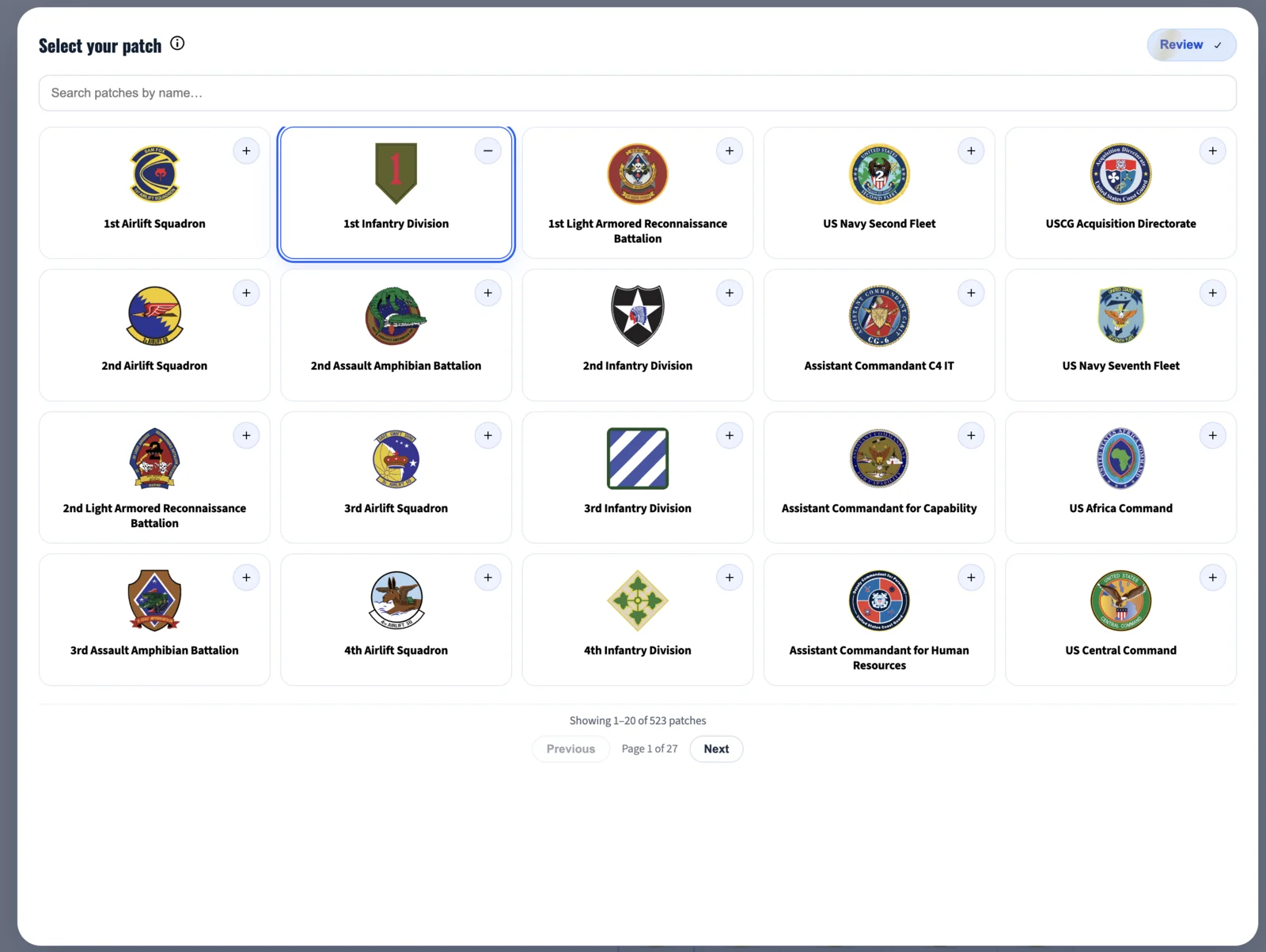
Independent patch workflow
Patches are intentionally separated from ribbon attachments so unrelated concepts do not compete inside one interface. Customers can browse visually, search the patch catalogue, and configure patch selections independently while the final choice remains connected to the overall product order. This also leaves room for future workflow combinations without complicating ribbon logic.
Scalable catalogue logic
The system maintains ribbon relationships, precedence, attachments, and patches as structured entities rather than hard-coded product-page choices. New catalogue items and workflow combinations can be added without redesigning the architecture.
Order continuity
Configuration context survives the complete WooCommerce lifecycle.
Many product builders reduce complex configurations to generic line items once customers leave the product page. That would force customers and production teams to reconstruct intent manually. This system preserves visual and operational context at every stage.
Cart and checkout
Customers continue seeing branch selection, ribbon-rack structure, attachment relationships, patches, and standard product options. They can verify the complete configuration before payment.
Account and order history
Structured configurations remain accessible from customer accounts, order-history screens, and order-detail pages instead of disappearing after checkout.
Email continuity
Order-confirmation emails carry meaningful configuration details rather than a simplified product name that lacks production context.
Administrative visibility
Internal teams receive the same structured configuration inside WooCommerce admin workflows, reducing clarification, screenshots, notes, and manual reconstruction.
Further implementation context
The persisted structure includes branch relationships, ribbon precedence, attachment relationships, patch selections, and product-specific options. Customer intent remains understandable from configuration through fulfillment.
Without this persistence, production teams would have to rely on screenshots, disconnected notes, internal clarification, or manual reconstruction. Carrying the same structured context through WooCommerce reduces that operational friction and gives both customers and staff a dependable record of what was configured.
Production & operations
The storefront feeds a production-aware operational ecosystem.
Ribbon structure, composition, attachment placement, and branch-specific ordering all affect physical production. The system therefore carries structured data beyond checkout and converts customer configurations into clearer production assets and operational workflows.
SVG production workflow
Printer-ready SVG generation converts configuration data into structured assets for internal review and fulfillment. It reduces manual recreation and creates a more reliable transition from customer selection to production preparation.
Connected fulfillment path
The workflow links customer configuration, operational validation, WooCommerce ordering, internal review, production preparation, and physical fulfillment.
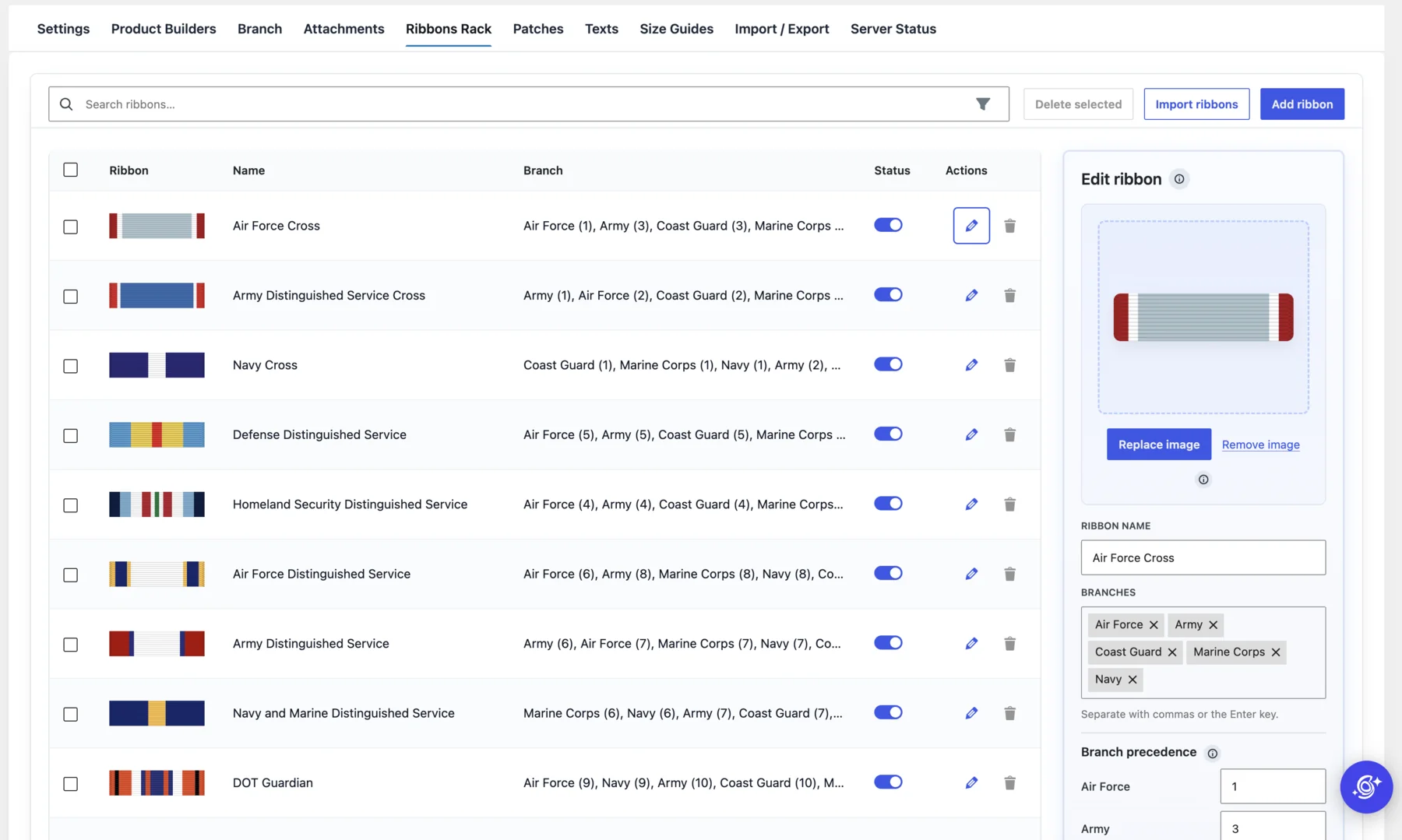
Product Builders
Administrators can create different modular workflow structures for different product types.
Branches
Branch management controls catalogue relevance, ordering rules, and workflow behaviour.
Ribbon Libraries
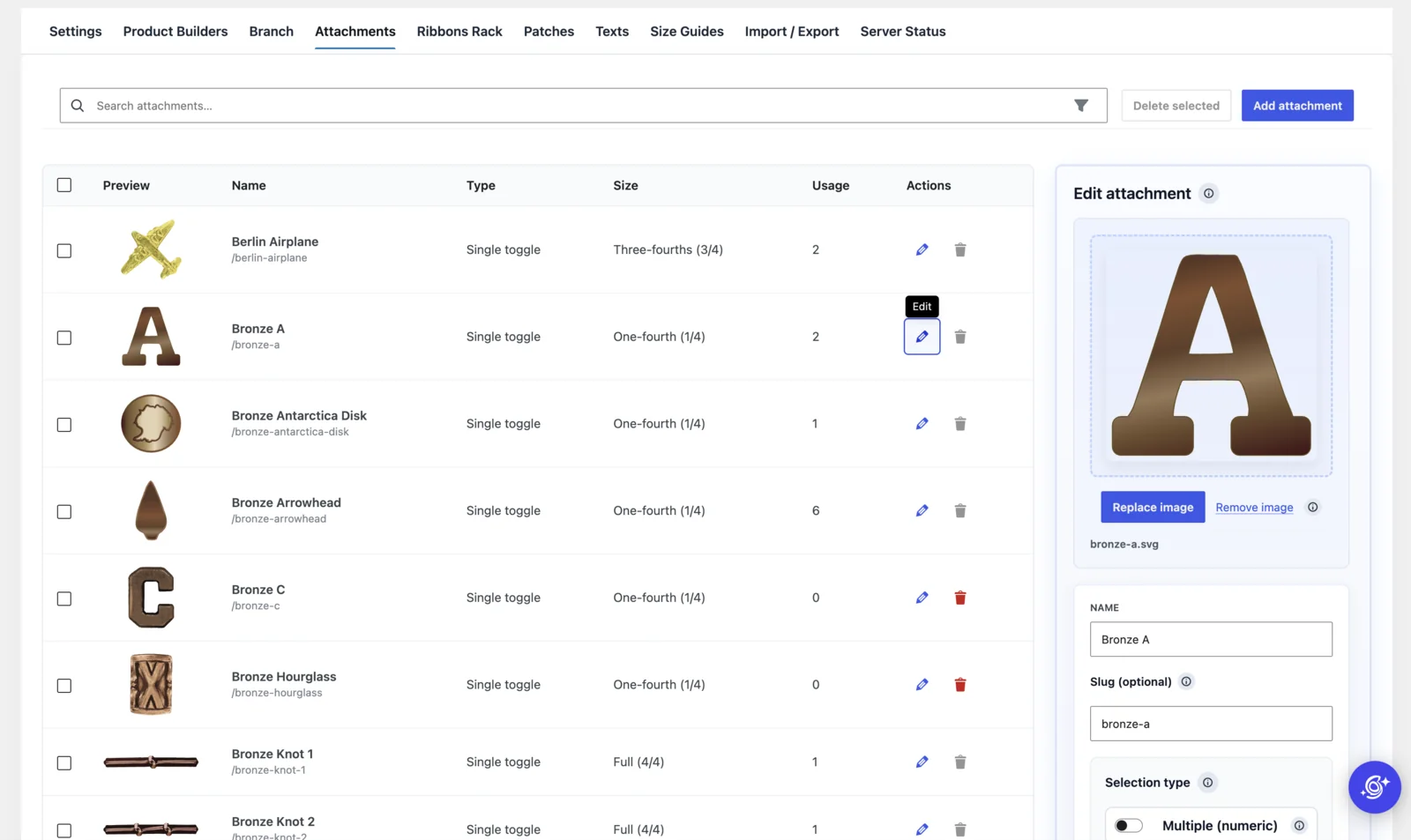
Catalogue tools support branch relationships, precedence handling, attachment assignment, and large-scale operations.
Attachments and patches
Both are managed independently while preserving their correct operational relationships.
Supporting content
Dedicated areas manage reusable text, size guides, builder content, and operational status.
Making a large catalogue manageable
Managing thousands of assets and their relationships was not simply a matter of uploading images. Ribbons, patches, and attachments needed to stay connected to branches, ordering rules, and product configurations. Maintaining those connections manually meant repetitive work and more opportunities for mistakes.
I built an import/export workflow so the client could prepare catalogue data using example CSV files, upload the corresponding assets together in a ZIP archive, and define their relationships through structured fields. Bulk updates no longer required every item to be configured individually.
The same workflow also helped during development. I could export a dataset, adjust it, and import it again to reproduce configurations and test changes—saving considerable setup and testing time.
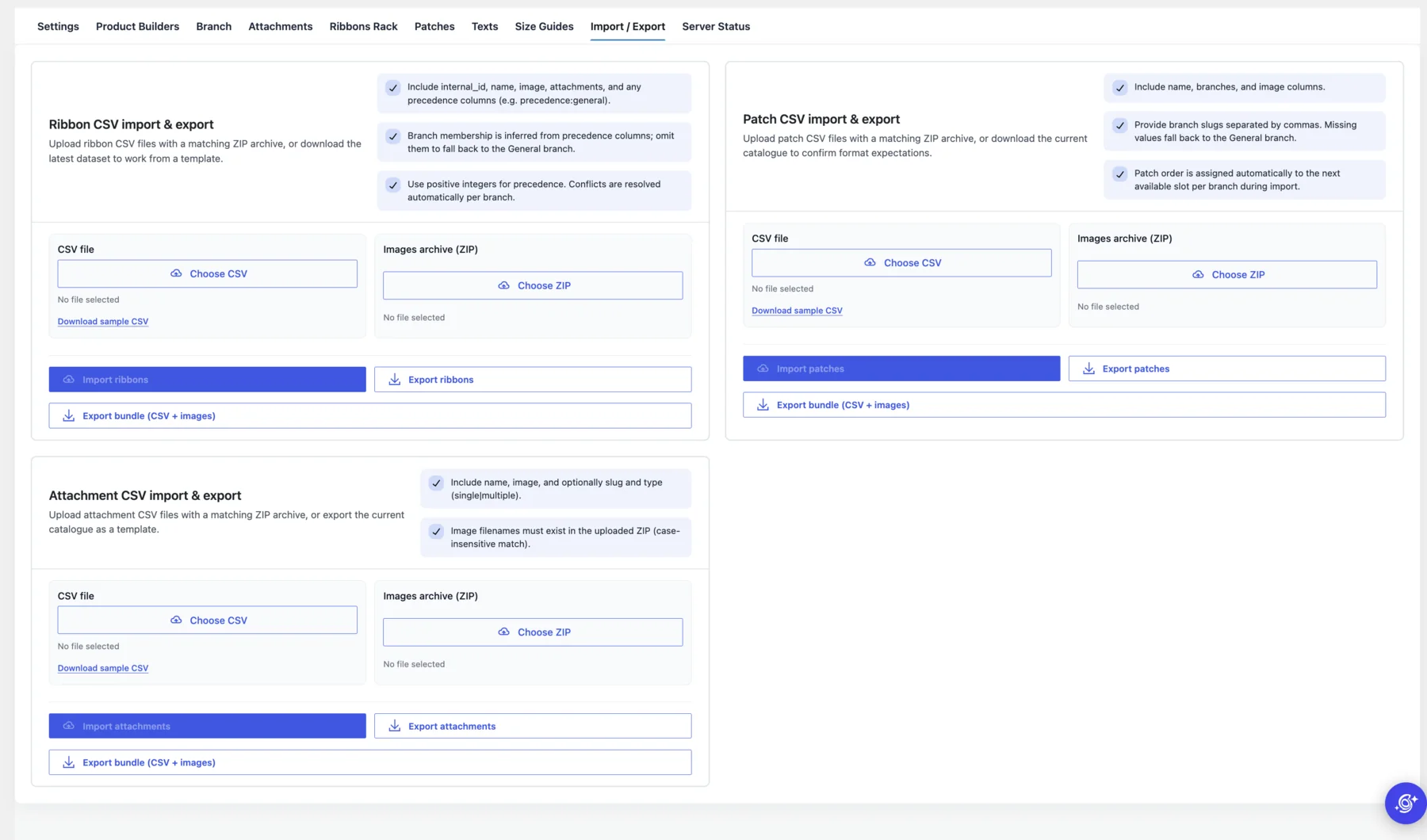
The production pipeline preserves the rack structure, visual composition, attachment placement, and branch-specific ordering that determine the physical result. Instead of interpreting a generic order line, the team receives an operational asset generated from the same configuration the customer reviewed.
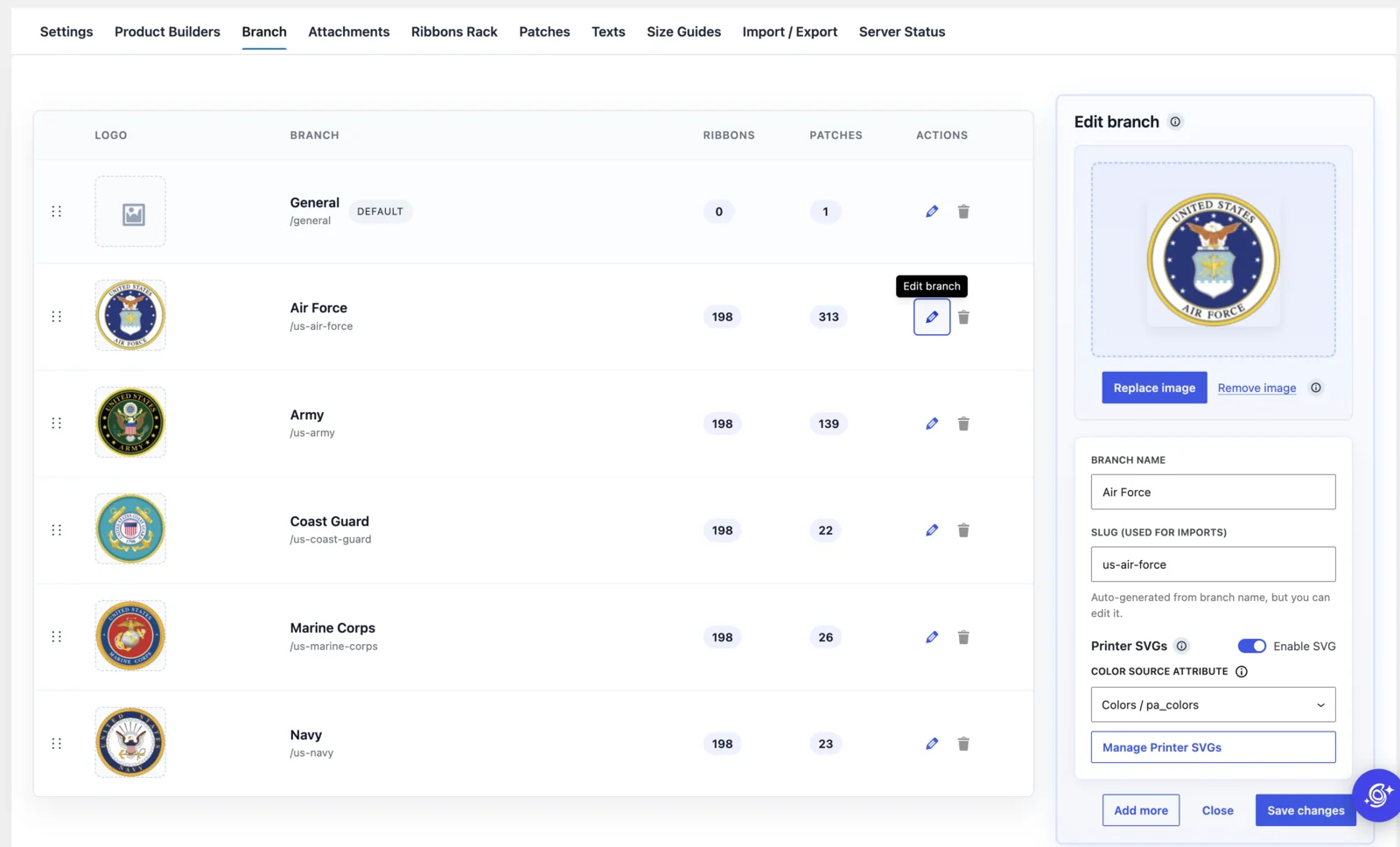
These tools form a centralized backend ecosystem rather than a collection of disconnected settings. Administrators can control workflow behaviour, catalogue relationships, product logic, builder structure, supporting content, and production status without depending on a developer for routine catalogue work. CSV imports, image bundles, exports, and large-scale updates keep hundreds of related records maintainable as the catalogue grows.
More administration screens
Operational impact
A clearer customer experience now produces cleaner operational data.
Customer improvements
- Visual product configuration
- Intuitive ribbon-rack building
- Clearer understanding of complex choices
- Confidence throughout checkout
- Visual review after purchase
Operational improvements
- Structured configuration workflows
- Cleaner visibility for internal teams
- Better catalogue organization
- Less manual clarification
- Production-aware order handling
- Scalable workflow infrastructure
Technology
A custom WooCommerce application designed around structured product data.
Platform & development
- WordPress
- WooCommerce
- React
- PHP
Configuration & data
- Dynamic builder architecture
- Structured persistence
- Catalogue tooling
Production & operations
- SVG generation
- CSV import/export
- Image-bundle processing
Final result
Customer confidence and fulfillment clarity share the same data foundation.
Show Your Stripes now operates with a fully custom product-configuration ecosystem connecting customer configuration, operational validation, order persistence, production preparation, and fulfillment.
The platform turns highly manual product customization into a scalable commerce workflow built around long-term catalogue growth, operational reliability, and production efficiency. It is far more than a configurator: it is the operational system behind the buying experience.